- JavaScript 49.6%
- PHP 44.6%
- CSS 2.8%
- Makefile 1.4%
- Shell 1%
- Other 0.5%
| .github/workflows | ||
| config | ||
| lib | ||
| locale | ||
| public | ||
| templates | ||
| tests | ||
| tools | ||
| vendor/fatfree | ||
| .editorconfig | ||
| .gitignore | ||
| app.php | ||
| Dockerfile | ||
| entrypoint.sh | ||
| installation.md | ||
| LICENSE | ||
| Makefile | ||
| README.fr.md | ||
| README.md | ||



PDF Signature
Free web software for signing, organizing, editing metadatas or compressing PDFs.
Instances
List of instances where you can use this software:
- pdf.24eme.fr
- pdf.libreon.fr
- pdf.hostux.net
- pdf.nebulae.co
- pdf.kaosx.ovh
- pdf.ti-nuage.fr
- pdf.cemea.org
- pdf.spirio.fr
- pdf.sequanux.org
- pdf.deblan.org
- pdf.ouvaton.coop
Feel free to add yours through an issue or a pull request.
License
Open-source software under the AGPL V3 license.
Table of Contents
Installation
Configuration
Enabling and Configuring Multi-Signature Mode
This mode allows multiple people to sign a PDF, but it requires that the PDFs be stored on the server.
It is not mandatory to enable this mode for the application to work; it is an option.
Create the config/config.ini file
cp config/config.ini{.example,}
In the config/config.ini file, configure the PDF_STORAGE_PATH variable with the path where uploaded PDF files can be stored:
PDF_STORAGE_PATH=/path/to/folder
Create this folder:
mkdir /path/to/folder
The web server should have write permissions on this folder.
For example, for Apache:
chown www-data /path/to/folder/to/store/pdf
Enabling digital signature
The digital signature depends on pdfsig from the poppler project (poppler-utils debian package) and certutil from libnss3 project (libnss3-tools debian package).
On debian :
sudo apt-get install poppler-utils libnss3-tool
To enable digital signature, create certificates in a NSS database. The shell script create_nss_certs.sh in tools helps to do it :
bash tools/create_nss_certs.sh NSS_DIRECORY/ MY_NSS_PASSWORD MY_CERT_NICK MY_SIGNATUREPDF_URL
Once created, set the following directives in the config/config.ini file.
NSS3_DIRECTORY=NSS_DIRECORY/
NSS3_PASSWORD="MY_NSS_PASSWORD"
NSS3_NICK="MY_CERT_NICK"
Disabling the Organize Mode
To disable the Organize mode, add DISABLE_ORGANIZATION=true to the
config/config.ini file.
Hiding or Modifying the Demo PDF Link
To hide the demo PDF link, add PDF_DEMO_LINK=false to the
config/config.ini file.
Default Fields for Metadata Editing
In the config/config.ini file, you can add as many fields as you want with the HTML input type (text, date, number, email, etc.) that will be preloaded for each PDF.
METADATA_DEFAULT_FIELDS[field1].type = "text"
METADATA_DEFAULT_FIELDS[field2].type = "text"
METADATA_DEFAULT_FIELDS[field3].type = "date"
METADATA_DEFAULT_FIELDS[field4].type = "number"
Update
The latest stable version is on the master branch. To update, simply fetch the latest changes:
git pull -r
Tests
To run functional tests:
make test
The tests are performed using puppeteer and jest.
To run the tests and view the browser (in debug mode):
DEBUG=1 make test
Libraries Used
- Fat-Free PHP micro framework: https://github.com/bcosca/fatfree (GPLv3)
- Bootstrap HTML, CSS, and JavaScript framework: https://getbootstrap.com/ (MIT)
- PDF.js JavaScript library for rendering PDFs in an HTML canvas: https://github.com/mozilla/pdf.js (Apache-2.0)
- Fabric.js JavaScript library for manipulating an HTML canvas: https://github.com/fabricjs/fabric.js (MIT)
- PDFtk PDF manipulation tools (GPL)
- librsvg SVG manipulation tools: https://gitlab.gnome.org/GNOME/librsvg (LGPL-2+)
- potrace Bitmap to vector image conversion tools: http://potrace.sourceforge.net/ (GPLv2)
- OpenType.js Tools for converting text and its font into paths: https://github.com/opentypejs/opentype.js (MIT)
- ImageMagick Image manipulation toolset: https://imagemagick.org/ (Apache-2.0)
- Caveat Handwriting-style font: https://github.com/googlefonts/caveat (OFL-1.1)
- PDF-LIB JavaScript library for PDF manipulation used for writing metadata: https://pdf-lib.js.org/ (MIT)
- Ghostscript GPL Ghostscript is a software suite for processing PostScript and PDF file formats (GPLv3)
- GPG GnuPG allows you to encrypt and sign your data and communications (GPLv3)
For testing:
- Jest JavaScript Testing Framework: https://jestjs.io/ (MIT)
- Puppeteer Node.js library for controlling a web browser: https://github.com/puppeteer/puppeteer (Apache-2.0)
Contributions
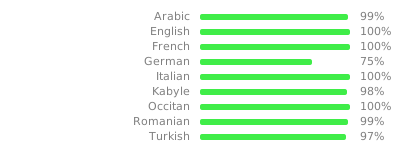
Translation
To update the translation, simply execute make that will update the .pot file,
which will merge the .po files which then will allow to create updated .mo files.
Contributors
These people are the authors of the code of this software :
Vincent LAURENT (24ème), Jean-Baptiste Le Metayer (24ème), Xavier Garnier (Logilab), Simon Chabot (Logilab), Tangui Morlier (24ème), Gabriel POMA (24ème), Tanguy Le Faucheur (24ème), Étienne Deparis, battosai30
Fundings
- 1 365 € excl. taxes from the company Logilab for the development of the shared signature feature
- 1 950 € excl. taxes from the company Logilab for the development of the metadata editing feature
- 100 € excl. taxes donations from the company Spirkop
- 100 € excl. taxes donations from the company PDG IT
- 1 040 € excl. taxes from the foundation NLNet pour software internationalization
The development of the software was primarily done during the working hours of 24ème employees.
Screenshots
Signature feature
Organizing feature
Metadata feature